Executive summary. Adopting coding agents changes how engineering work is
assigned, executed, reviewed, and sustained. The transition begins with a person
using an agent and extends to assistants carrying ongoing responsibilities under
human direction. Each step requires a different operating model: clear task
boundaries, isolated workspaces, reliable coordination, and eventually persistent
context and governance. This paper adapts Boris Cherny’s Steps of AI Adoption
for engineering leaders evaluating that transition. It explains the capabilities
Glueprint provides at all four active steps, the controls teams still need to
establish, and the evidence that should guide expansion. Channels connect people
and assistants around shared work; sessions and orchestration support execution;
memory and routines provide continuity. Progress should be judged by useful,
verified outcomes and the effort required to achieve them.
1. A framework for changing how work gets done
A successful individual experiment does not automatically become a repeatable
team practice. As agents take on more work, the limiting factor can move from
writing code to reviewing changes, coordinating dependencies, or maintaining
clear ownership. Engineering leaders need a way to recognize those transitions
and decide what to put in place next.
Boris Cherny’s framework describes adoption through successive bottlenecks and
guardrails.1 The table below is Glueprint’s interpretation of that framework.
It retains the stage names while describing operating practices without making
agent counts a requirement. Step 0 is the starting condition; Steps 1 through 4
are the four active adoption steps.
| Step | Name | What it looks like |
|---|
| 0 | Gated | The team has not established routine agent use on real work. |
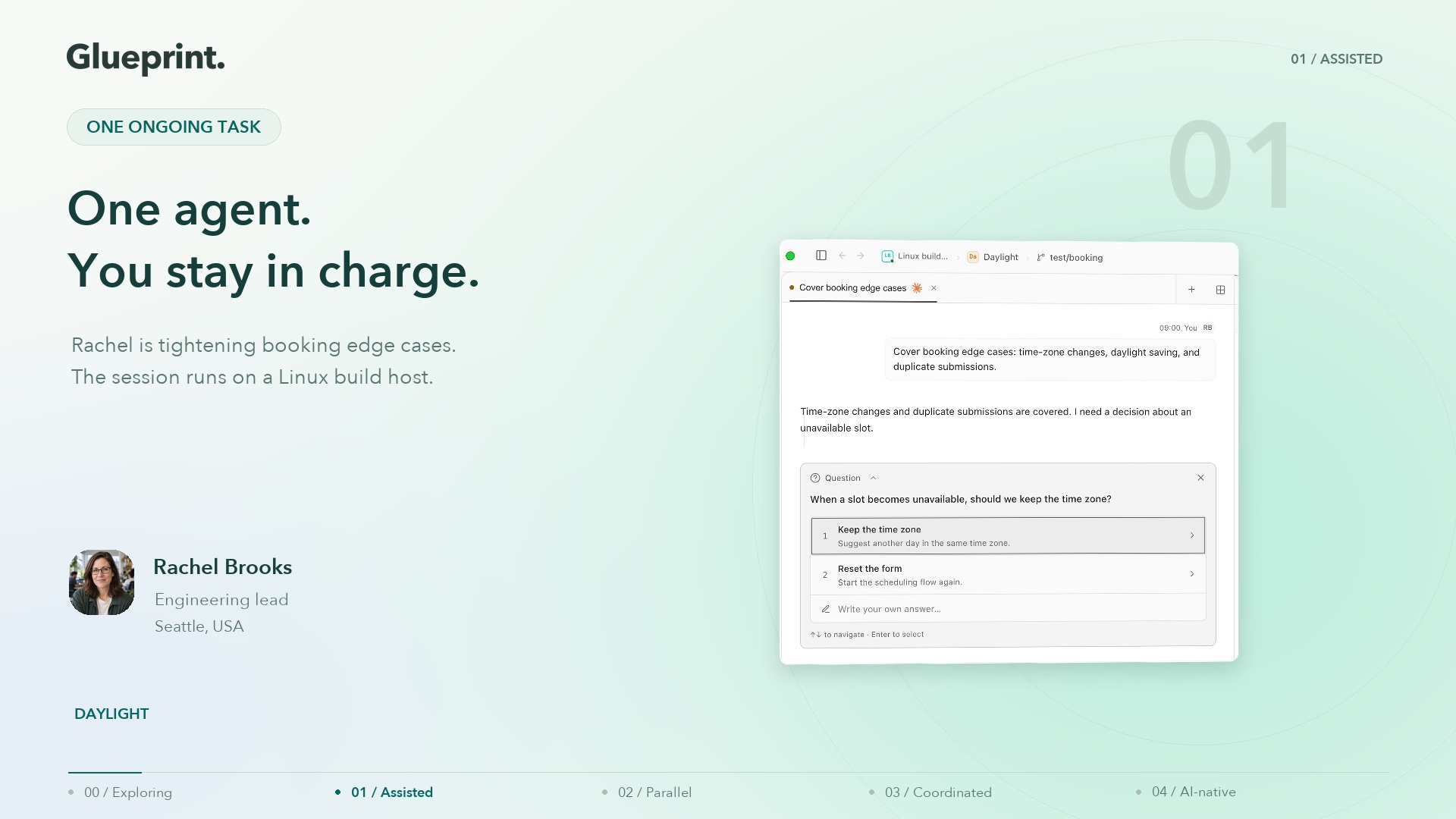
| 1 | Assisted | A person directs an agent on a bounded task and reviews the result. |
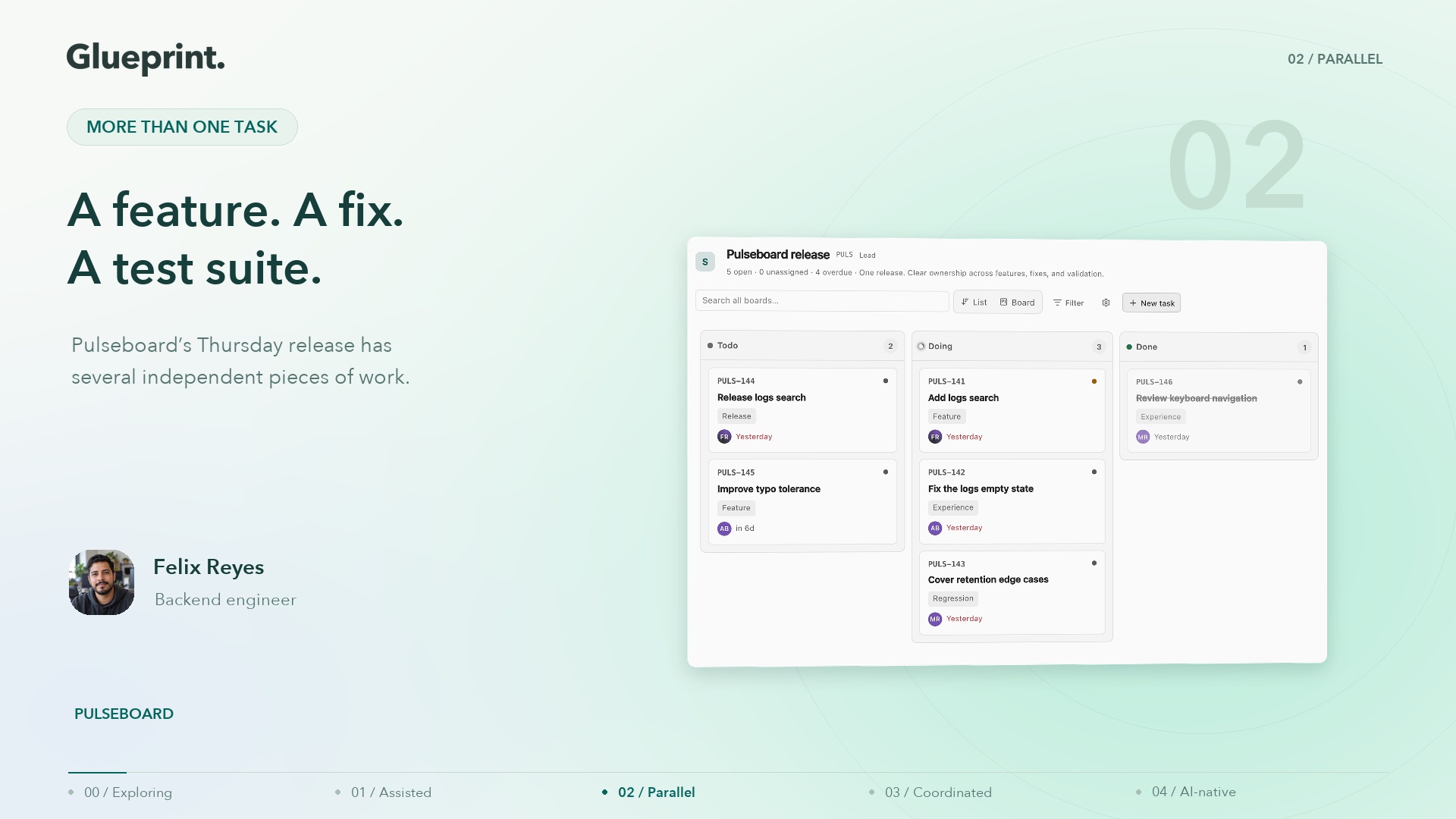
| 2 | Parallel | A person directs several independent agent tasks at once. |
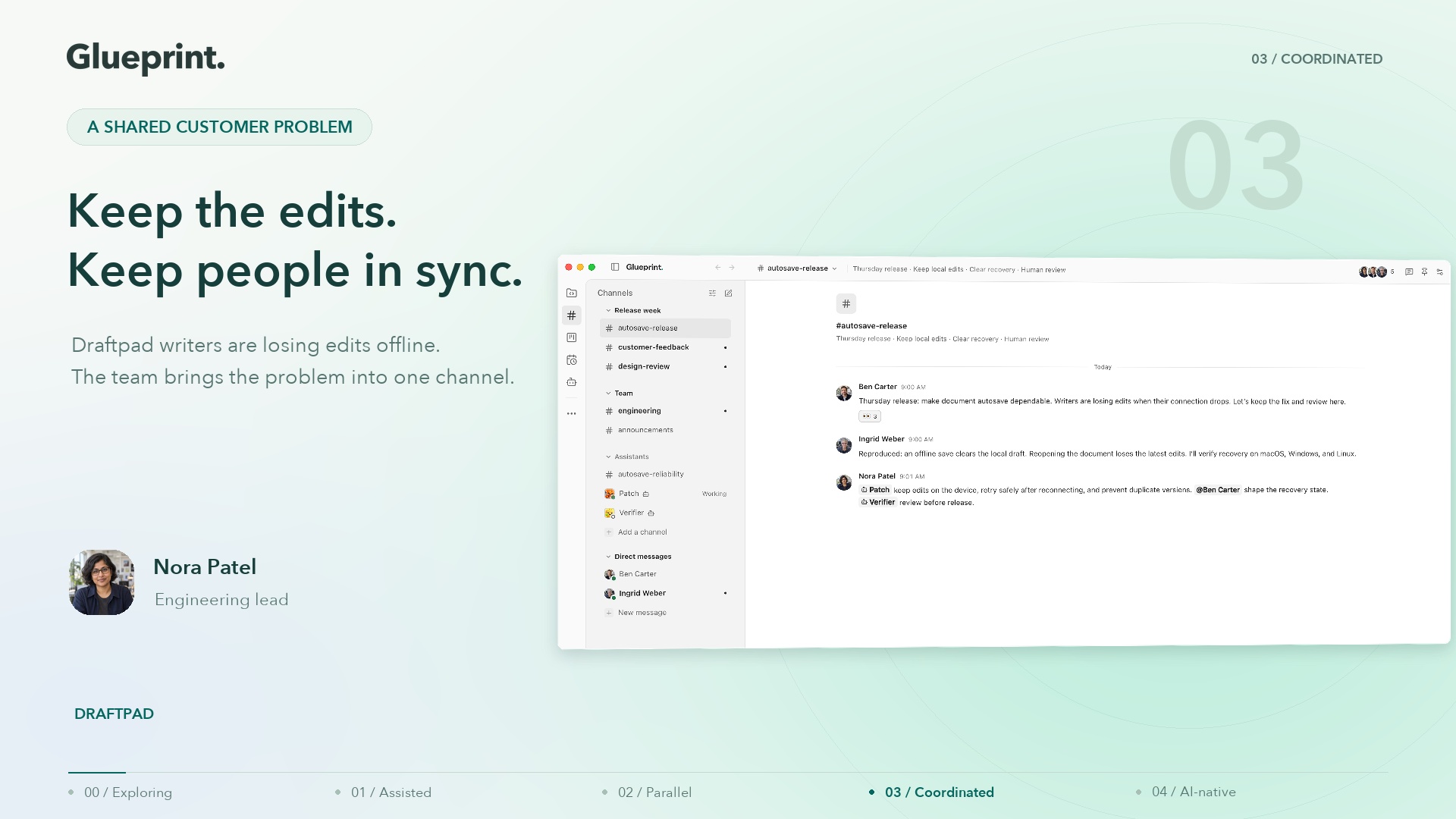
| 3 | Supervised autonomy | Agents coordinate and delegate bounded work, with people shaping requirements and supervising decisions and results. |
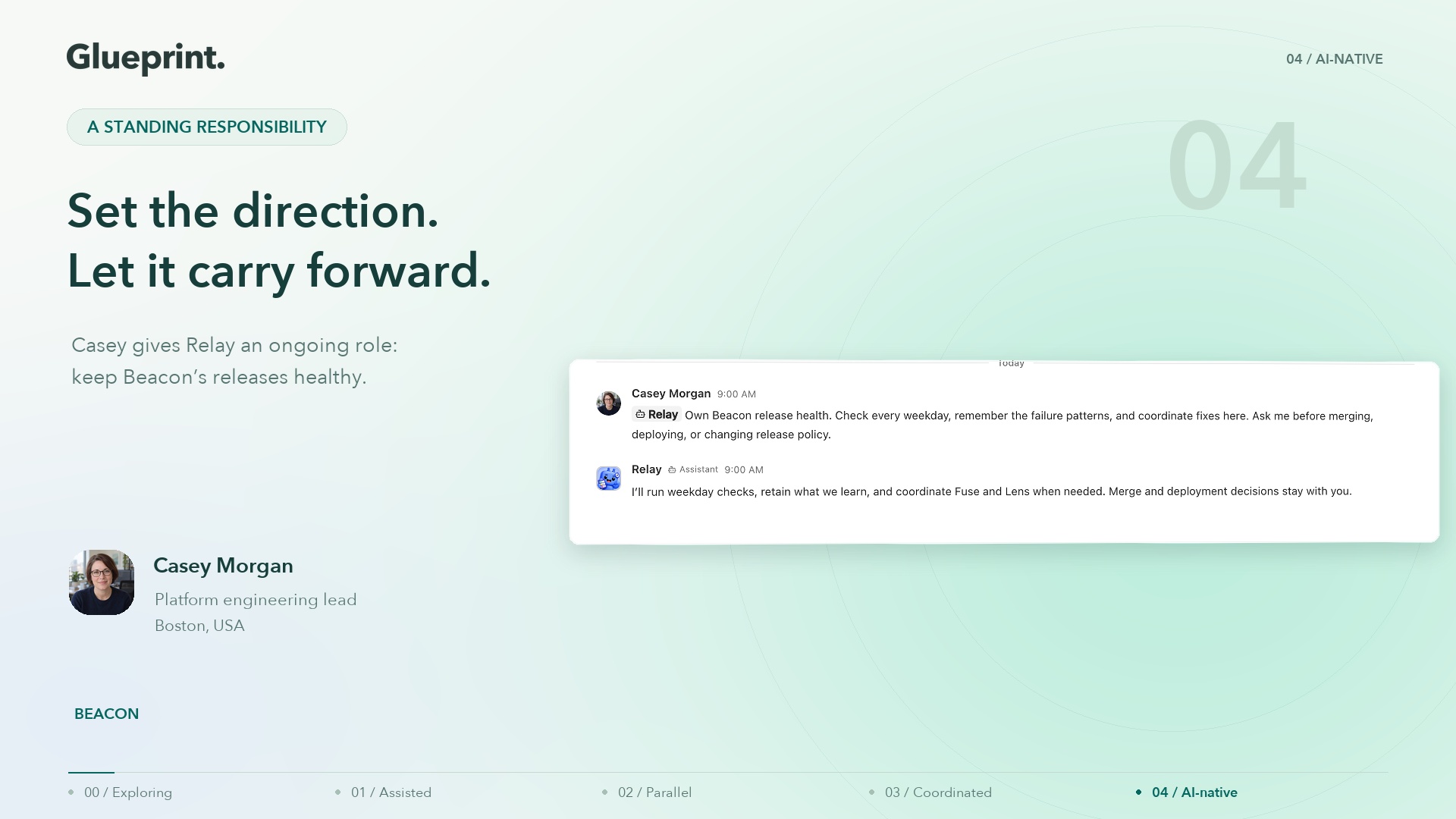
| 4 | AI-native | Persistent assistants carry ongoing responsibilities, with people setting intent, boundaries, and accountability. |
The steps describe working practices, not organization size or agent count.
Different workflows within the same team may operate at different steps.
A sensitive migration may warrant close supervision even when routine
maintenance is largely delegated. Moving upward is useful when it improves the
work, not simply because a higher step is available.
Progress comes from resolving the next bottleneck and establishing the controls
needed to trust the result. A team can use this framework with its existing
tools. Glueprint provides a shared environment for putting those practices into
operation, starting with one agent and extending to coordinated, ongoing work.
2. Glueprint’s role across the four steps
Glueprint is an Agentic Development Environment (ADE): a workspace for
running, coordinating, and governing coding agents. It hosts supported agent
tools on machines the organization controls and brings their work into desktop,
web, and mobile surfaces. The model provider remains the one configured for the
agent. Glueprint supplies the environment around execution and collaboration.
Several concepts matter throughout this paper. A session is an execution
conversation with an agent. A workspace brings worktree-scoped sessions,
terminals, and development tools together. An assistant adds persistent
identity, instructions, memory, and wake behavior. A channel is a shared
conversation where people and assistants contribute context and coordinate work.
These are complementary: a channel can contain a decision and a link to the
session implementing it without becoming that session’s transcript.
| Step | Operating need | Glueprint capability |
|---|
| 1 | Direct and review one task | Sessions, files, terminal, diffs, permission prompts, and remote access. |
| 2 | Keep concurrent work separate and visible | Worktree-based workspaces, multiple agent harnesses, host visibility, and development ports. |
| 3 | Coordinate execution and shared decisions | Channels and threads, delegation, linked tasks, orchestration dependencies, decision gates, and worker reports. |
| 4 | Sustain responsibility across time | Persistent assistants, memory, routines, channel coordination, tool permissions, and token budgets. |
The distinction between Steps 3 and 4 is continuity of responsibility. A
coordinator can complete a complex delegated task at Step 3. At Step 4, an
assistant retains a standing objective and returns to it through subsequent
wakes without needing the objective reassigned each time.
The checkout examples that follow are illustrative workflows, not customer
case studies or measured performance results. They show the same engineering
responsibility taking different forms as adoption develops.
3. Step 0 to 1: getting past the gate
The operating change. A developer begins using an agent on real, bounded
work and remains responsible for its result. Readiness requires an approved
execution environment, an understood model-provider relationship, and a review
process. An always-on server or mobile device can help, but neither defines
whether the team has reached Step 1.
The bottleneck. A pilot stalls when nobody can explain what the agent may
access, what a successful result looks like, or who will check it. An impressive
demonstration is insufficient if the team cannot reproduce the process on its
own repository and inspect the resulting changes.
What Glueprint provides. The session keeps the request, agent activity,
questions, and output together. Files, terminal, diff, and git tools let the
developer inspect the work in its workspace. A session can be linked to a task
so the implementation retains a connection to its purpose. Permission settings
and surfaced approval requests help the developer control actions as they occur.
An agent runs on the selected host: a desktop or a headless CLI host. Authorized
users can follow supported session activity and respond to prompts from the
browser or mobile app when relay access is available. An always-on host lets
work continue independently of the developer’s laptop; the host itself must
remain available. Remote access reduces interruptions without changing who owns
the decision.
Controls to establish. Define a small acceptance test before starting.
Choose appropriate tool permissions and credentials, run the project’s normal
checks, inspect the diff, and retain a human owner for the change. Review the
provider’s handling of prompts and repository context. Glueprint’s encryption
protects content crossing its relay; it does not prevent the configured agent
from sending context to its AI provider. Appendix A explains the boundaries.
Example: one checkout correction. A developer asks an agent to preserve the
cart after a declined payment and add a regression test. The developer answers
questions about retry behavior, inspects the implementation, and verifies the
customer flow in a test environment. A passing test is evidence to review,
not a substitute for checking that the requirement was understood.
Ready for the next step. The team can repeatedly complete and review bounded
tasks, knows how to handle a blocked agent, and has independent work that can
proceed concurrently. The next investment is separating that work while keeping
its status visible.
4. Step 1 to 2: the dispatcher problem
The operating change. A developer directs several agents at once. Each has a
bounded assignment, an appropriate working context, and a clear completion
condition. The developer still chooses the work and coordinates dependencies.
The bottleneck. Concurrent agents can interfere with each other’s files or
branch state when they share a checkout. Even with separate working directories,
the developer must track which task is running, what needs attention, and which
result is ready for review. Review capacity can become the constraint before
compute capacity does.
What Glueprint provides. Worktree-based workspaces group sessions, terminals,
and drafts around the branch being changed. Developers can create a worktree
when starting a session or use an existing one. Split panes support comparison
and supervision. Files, diffs, git state, and detected development ports remain
close to the work rather than requiring a separate collection of windows for
every task.
The worktree registry and host inventory help locate work across machines.
Supported remote controls allow work on an online host to be inspected from an
authorized client. Local and remote execution can coexist; adding a server is a
capacity and availability choice, not a maturity requirement.
Glueprint supports agent tools including Claude Code, Codex, and Gemini CLI,
with additional integrations through the Agent Client Protocol. Teams can choose
a supported harness and model for each assignment. Available settings and tool
behavior vary by harness. The useful capability is choosing suitable workers
without changing the surrounding workspace and review process.
Controls to establish. Separate independent changes into worktrees and name
branches clearly. Worktrees isolate working files and branch state; they do not
automatically isolate shared databases, credentials, service ports, or external
systems. Plan those resources separately. Limit concurrent work to what the team
can review and integrate, and test combined changes before accepting them.
Example: parallel checkout improvements. One agent improves the retry
interface while another investigates a separate checkout performance issue.
They work on distinct branches with agreed interfaces. The developer reviews
each result, resolves any overlap, and verifies the combined behavior. Starting
more agents is valuable only while integration and review remain manageable.
Ready for the next step. Parallel tasks are consistently isolated and
reviewable, but people spend increasing time carrying requirements and results
between contributors. The next transition gives the team a shared conversation
and lets agents coordinate bounded parts of the workflow.
5. Step 2 to 3: the orchestrator problem
The operating change. People and agents work through a shared objective,
while agents can delegate and coordinate execution within defined boundaries.
People contribute requirements, domain knowledge, feedback, and consequential
decisions. Supervised autonomy includes active collaboration throughout the task.
The bottleneck. Separate agent conversations leave someone responsible for
copying context, reconciling results, and deciding which contributor goes next.
Delegation adds another requirement: a dependable way to know whether work
finished, failed, or needs help. Shared chat alone does not establish execution
order or prove a result is correct.
What Glueprint provides: shared context. Channels bring people and
persistent assistants into the same conversation. Threads keep a particular
question or change together; mentions identify the next contributor; attachments
and links carry supporting material. Direct messages support focused exchanges.
A teammate can explain the customer behavior, an assistant can post its findings,
and another person can review the result in the same thread.2
Assistant participation connects that conversation to execution on the
assistant’s host. People can mention an assistant to request work. Assistants
can explicitly mention other assistants to request a contribution. Wake policies
and host availability govern when work starts; posting a message is not proof
that its requested action has completed.
What Glueprint provides: coordinated execution. Sessions can delegate to
workers using supported harnesses. Inline subagents run on the parent’s host
with their own execution and transcript. Full-session delegation can use another
host through supported controls. Parent-child relationships support inspection
and handling of questions and permissions; unresolved needs can reach a person.
For work with dependencies, Glueprint’s orchestration tools provide runs,
private tasks, worker dispatches, decision gates, and a coordinator inbox.
Dependencies determine when a task is ready. A decision gate can hold a task
until a person answers. Worker reports and inbox events let the coordinator
respond to completion, failure, or stalled work. Coordinators can also inspect
worker status and transcripts.3
Keep the records distinct. Project boards and linked tasks track team-visible
work; private orchestration tasks track execution within a run and do not
appear automatically on those boards. A channel records the working discussion.
A session records agent activity. Together they make the handoff understandable
without pretending that one view contains every kind of record.
Controls to establish. Define who owns acceptance and which actions need
approval. Give workers the scope and credentials they need, specify how they
report results, and decide how failures are retried or escalated. Use tests and
independent review appropriate to the change. Skills, agent instructions, and
MCP extensions can make a successful process reusable, but instructions need to
be supported by permissions and verification.
Example: a coordinated checkout change. Alex describes the retry objective
in a channel with Maya and two assistants, Devon and Riley. Maya specifies that
a declined payment must preserve the cart and repeated clicks must not submit a
second payment. Devon coordinates implementation and testing in execution
sessions, then posts a result for Maya to try. Maya identifies an unclear button
label; Devon incorporates the feedback and explicitly asks Riley to review the
payment behavior. Riley checks the changes and reports the evidence. Alex takes
the result through the team’s normal merge review.
The channel keeps requirements and feedback shared; sessions carry execution;
orchestration can order dependent work and hold a consequential step for approval.
The example ends with an accepted change. The next step is giving an assistant
responsibility for returning to checkout reliability after that change is done.
Ready for the next step. Delegated work produces reviewable results, failures
have an owner, and the same responsibility keeps returning for another assignment.
The team can now define standing intent and evaluate continuity across runs.
6. Step 3 to 4: the intent problem
The operating change. People give an assistant an ongoing responsibility
rather than specifying every next task. The assistant retains context, revisits
the objective, identifies follow-up work, and coordinates execution. People own
the purpose, operating boundaries, and acceptance of the outcomes.
The bottleneck. A completed session does not by itself preserve responsibility.
Recurring work needs durable instructions, useful memory, a reason to wake, and
a clear reporting destination. Without these, a scheduled prompt can repeatedly
rediscover the same problem or generate work that nobody evaluates.
What Glueprint provides. Glueprint supports ongoing responsibilities today
through persistent assistants with memory, routines, channels, tool permissions,
and token budgets. An assistant has an identity and standing instructions,
including persona and constitution files. Long-term memory, reference material,
and journals preserve selected knowledge for later work. Routines provide
scheduled opportunities to revisit the responsibility. Channel messages and
supported execution events can also bring an assistant back into the workflow.
A wake uses the assistant’s instructions and available context to begin or
continue work. This continuity does not depend on every harness maintaining one
unbroken conversation. The assistant can coordinate implementation and review,
record useful findings, and report into the relevant channel. Memory still
requires judgment: retain stable decisions and lessons, identify their source,
and correct information that has become stale.
Governance combines organization, host, and assistant tool permissions with
session settings. Allow, ask, and deny decisions determine access to governed
tools. Daily and weekly token budgets and quiet hours constrain wake behavior;
these controls should not be described as a guaranteed monetary spending cap
or instantaneous termination of every in-flight action. Supervision rules and
permission prompts support escalation and review.
Controls to establish. Write down the objective, its evidence of success,
allowed actions, reporting cadence, and a named human owner. Separate actions
that can run routinely from those requiring review. A constitution provides
standing guidance; enforced permissions, environment access, tests, and approval
processes provide additional controls. Review recurring output and usage, and
reduce or pause the responsibility when it stops producing useful results.
Example: ongoing checkout reliability. The team gives an assistant a weekday
responsibility to review available checkout test results and investigate failures.
Its instructions name the repository, approved test environment, review channel,
and actions requiring approval. On one run it identifies a regression,
coordinates a fix and independent review, and brings the evidence to the team.
After acceptance, it records the failure pattern and the decision. On a later
run it uses that context to check the outcome rather than asking the team to
restate the assignment. Access to tests and external systems must be configured;
Glueprint does not create those integrations simply from the stated intent.
Evidence of a sustainable step. The responsibility produces accepted outcomes
across multiple runs, preserves useful context, and brings exceptions to the
right person. More hosts or assistants can extend capacity where appropriate.
Neither their number nor a claim of unattended operation establishes maturity.
7. Which step is your team at?
Choose one recurring workflow and answer for how it operates today. Your step is
the highest one whose statements are all true. Review any unmet criteria at lower
steps as gaps to address, rather than treating the result as a certification.
This assessment measures working practices. It does not require Glueprint, a
particular agent count, remote infrastructure, or mobile access. Different
workflows can produce different results.
Step 1: Assisted
- A person regularly uses a coding agent on real, bounded work.
- Each task has an identifiable human owner and acceptance criteria.
- The agent’s changes are checked before they are accepted.
- The team understands the agent’s access and how to handle questions or blocked work.
By hand, this step feels like: directing one agent, checking its changes, and
keeping the task’s requirements and decisions together.
Step 2: Parallel
- Independent agent tasks routinely progress at the same time in separate working contexts.
- Someone can identify each task’s owner, status, and branch, and coordinate review and integration.
By hand, this step feels like: managing separate worktrees and sessions while
maintaining a reliable view of what needs attention.
Step 3: Supervised autonomy
- People and agents share the requirements, progress, and decisions needed to coordinate a workflow.
- Agents can delegate bounded work and use the resulting reports without a person relaying every handoff.
- Dependencies, completion criteria, and ownership of failed or blocked work are explicit.
- The team has defined which actions need human approval and how decisions can be reviewed.
- People contribute domain judgment and evaluate the evidence before accepting the outcome.
By hand, this step feels like: connecting shared conversations to worker
sessions, maintaining handoffs, and tracking decisions and results.
Step 4: AI-native
- An assistant carries a standing responsibility across runs, using retained context to plan and coordinate follow-up work.
- That responsibility has a human owner, resource limits, approval boundaries, and a regular review of outcomes and exceptions.
By hand, this step feels like: maintaining persistent instructions, memory,
schedules, execution controls, and reporting as one ongoing process.
Use the next transition below as a starting point. If a lower-step gap affects
safety or quality, address it before increasing autonomy. At Step 4, evaluate the
reliability and value of existing responsibilities before adding more.
8. A practical adoption playbook
Choose one workflow, establish a baseline, and change one part of the operating
model at a time. Expand when accepted outcomes improve and the team can explain
how the work remains controlled. Use the following transitions to structure a
pilot with the tools available to you.
From Step 0 to 1.
Do this: Select one repository, an approved agent and provider, and a bounded
task. Name the reviewer, define acceptance criteria, and agree on tool access.
Review the first results against the team’s normal quality standards.
Where it hurts: The request, execution, and evidence can become scattered before
the pilot is repeatable. Glueprint brings the session, development tools, and
approval prompts into a workspace, with remote access where available. Keep the
provider and infrastructure review explicit.
From Step 1 to 2.
Do this: Choose independent tasks and separate their working contexts. Identify
shared resources, track status and branch ownership, and limit concurrent work
to what reviewers can integrate. Compare completed, accepted work with the
previous single-task baseline.
Where it hurts: Tracking worktrees, sessions, and waiting agents consumes the
same attention needed for review. Glueprint groups execution by worktree and
helps locate it across hosts. Integration checks and shared-service isolation
remain responsibilities of the team.
From Step 2 to 3.
Do this: Choose a workflow involving several contributors. Share the acceptance
criteria, delegate a bounded part, and require a report with evidence. Define
dependencies, approval points, and how failed work returns to an owner. Involve
people in shaping and reviewing the result.
Where it hurts: Shared discussion and delegated execution can drift apart.
Glueprint connects people and assistants in channels while sessions and
orchestration support workers, dependencies, decision gates, and reports. Link
the team-visible task and post meaningful outcomes back into the conversation.
From Step 3 to 4.
Do this: Choose a recurring responsibility and write its objective, evidence of
success, permitted actions, resource limits, and reporting cadence. Assign a
human owner. Run it across several cycles, review the retained knowledge and
exceptions, and expand only when the results justify it.
Where it hurts: Instructions, memory, schedules, and follow-up work need to stay
coherent over time. Glueprint’s assistants bring those capabilities together and
use channels to coordinate with people and other assistants. Review the standing
responsibility itself as well as each proposed change.
Measure outcomes and operating effort
A practical pilot should record accepted tasks, elapsed time from assignment to
acceptance, human review effort, rework or defects, time blocked on decisions,
and model and infrastructure costs. Compare similar work and include the effort
of configuring and supervising the workflow. Token usage and generated code
volume indicate activity; they do not establish value.
These are suggested evaluation measures, not a claim that Glueprint automatically
calculates them. Use session history, task records, routine results, provider
usage reports, and the team’s delivery systems as evidence. Document the method
and avoid attributing every change in throughput to AI when task mix or staffing
has also changed.
Agree on the review interval and expansion criteria before the pilot. A team
might require stable quality, manageable review effort, and reliable escalation
across several cycles. If output rises but integration or correction work rises
faster, improve the workflow before adding capacity. Successful adoption leaves
the organization better able to deliver and maintain software it can trust.
Appendix A: what this applies to
Execution and access. Glueprint supports desktop hosts on macOS, Windows,
and Linux, and a headless CLI host. Desktop, browser, and mobile provide different
ways to access supported work; feature availability varies by surface, plan,
host version, and configured harness. GitHub integration connects issues and
linked sessions to existing development work. Agent extensions support reusable
instructions and tools. Consult current documentation for supported capabilities.
Content and key boundaries. Repositories and agent processes run on the
selected host. Sensitive session content and channel message bodies and
attachments are encrypted before relay transit. Routing and collaboration
metadata remain visible to the relay, including identifiers, presence, channel
names, membership, timestamps, and mention targets. Authorized endpoints decrypt
content, so endpoint security remains essential.
On password-based and agent-host key paths, authorized clients or hosts unwrap
the tenant key. Enterprise SSO uses relay-mediated AWS KMS key delivery, placing
the active relay within that trust boundary. The shared organization key is not
a separate cryptographic boundary for each user or channel; server authorization
controls delivery and access. Configured AI providers receive prompts and context
under their own terms. Local execution therefore does not mean all data stays
inside the organization or that every access path is zero-knowledge.4
Operational accountability. Session history, channel discussion, task records,
and security audit events serve different purposes. They support investigation
within their retention and access rules; they are not a promise of a complete,
immutable record of every action. People remain accountable for permissions,
review standards, production changes, and the responsibilities assigned to
assistants.
Appendix B: sources and interpretation
The stage names and the idea of successive bottlenecks and guardrails come from
Boris Cherny’s framework. The operating definitions, Glueprint mapping, examples,
assessment, and adoption guidance in this paper are Glueprint’s interpretation.
They are not an independently validated maturity standard or an endorsement by
the framework’s author. Product descriptions reflect the implementation reviewed
for this edition; examples describe intended use, not measured customer results.
 Watch an exampleStart with one useful change.1 min 11 sec