Git & review
Review, then ship.You make the call.
Glueprint puts Git beside the agent that made the change: read the diff, stage what you mean, merge locally, open the pull request and follow its checks, all in one workspace. The GitHub plugin brings pull requests, issues and Actions from every repository into one place.
- Review
- Diffs · hunks · three-pane conflicts
- Branches
- Worktrees · compare · history graph
- GitHub
- Pull requests · checks · issues · Actions
Git, beside the work.Not in another app.
Every workspace has a Git panel on its right. This one shows the feature branch an agent just finished: two changed files, ready to read, stage and commit.
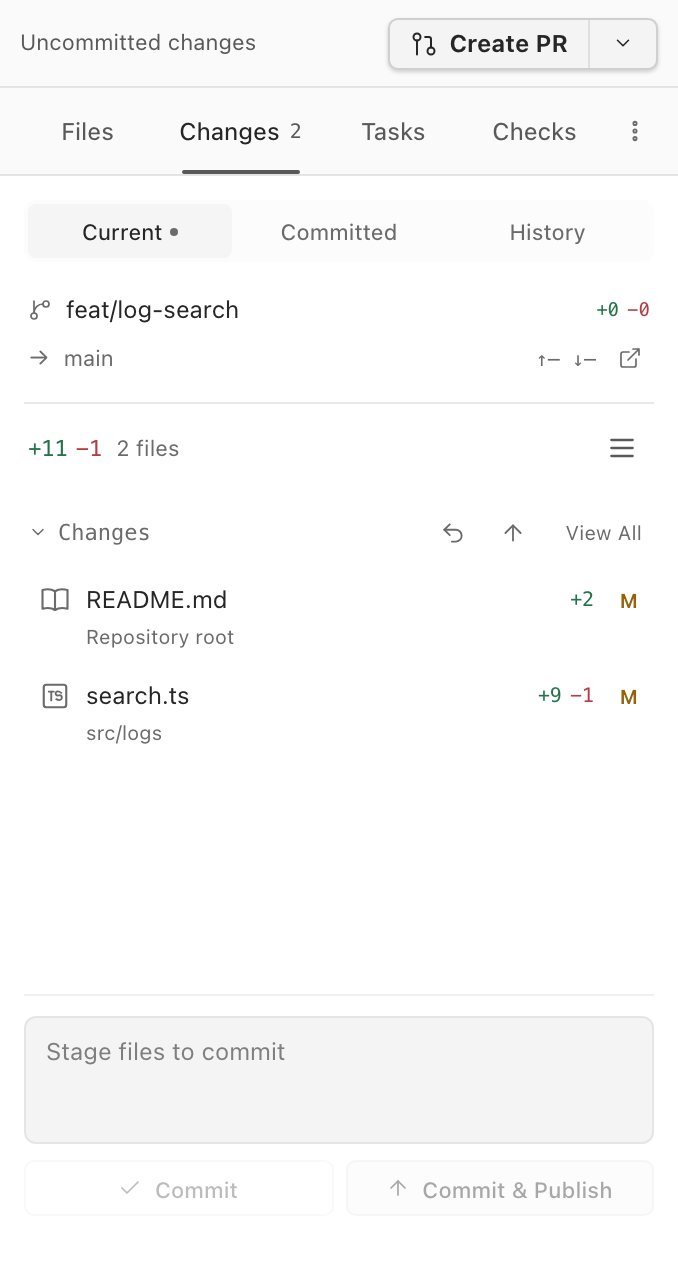
- 01Create PROpen a pull request from the branch, written by you or prepared by a session.
- 02Files, Changes, Tasks, ChecksThe workspace's files, its uncommitted changes, linked tasks, and the pull request's CI checks.
- 03Current, Committed, HistoryWhat's uncommitted, what the branch has committed, and the commit graph.
- 04Branch and baseThe branch, the base it's compared against, and how far ahead or behind it is.
- 05Changed filesEvery changed file with its added and removed lines. Open one to read its diff.
- 06CommitStage, write the message, then Commit, or Commit & Publish in one step.
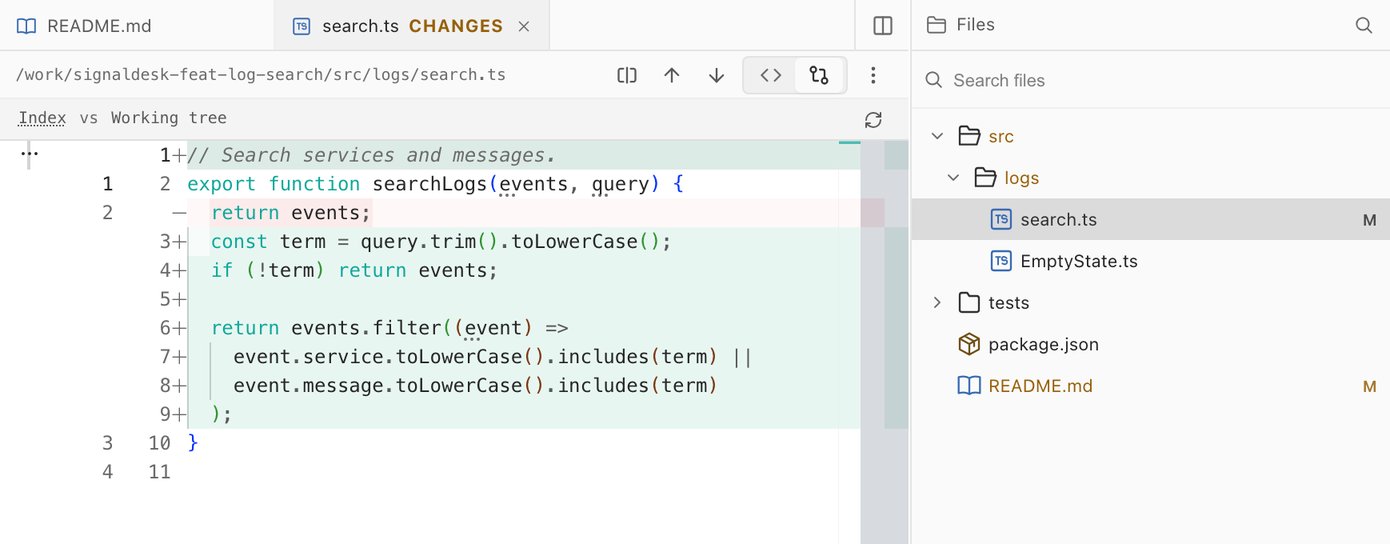
Read the diff.Stage what you mean.
Open any changed file in its Changes view to see exactly what moved since the last commit, in the same editor you write code in. Keep editing right in the diff, then stage the parts you mean to keep.
- Stage and unstage a whole file or a single hunk.
- Jump between changes with F7 and Shift+F7.
- Inline or side-by-side diffs, with whitespace shown when you need it.
- Commit with Cmd/Ctrl+Enter, or commit and push in one step.
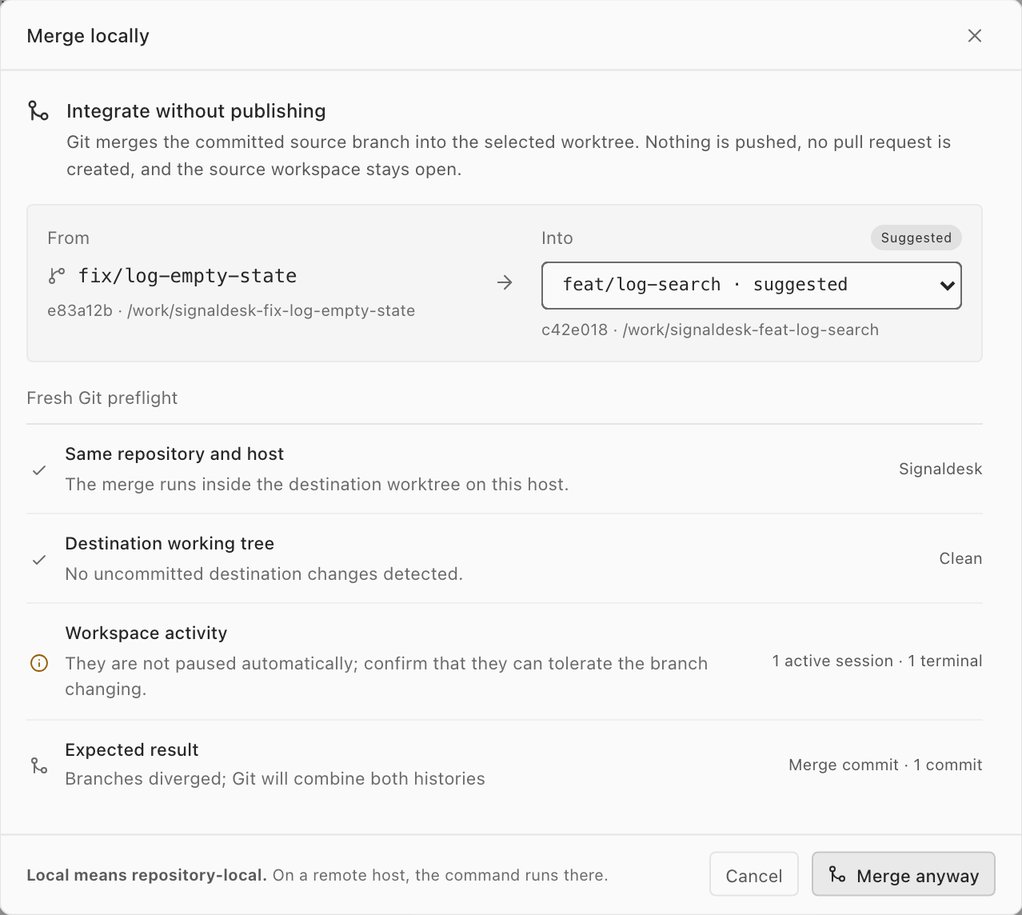
Merge locally.Know the result first.
Bring a finished branch into another worktree without pushing anything. Before it runs, Glueprint checks that both are in the same repository and host, that the destination is clean, which sessions are still working there, and what Git will do.
- Nothing is pushed and no pull request is created. The source workspace stays open.
- Merge or rebase onto any branch, and continue, skip or abort from the banner if it stops.
- Resolve conflicts in a three-pane editor: yours, theirs and the common base.
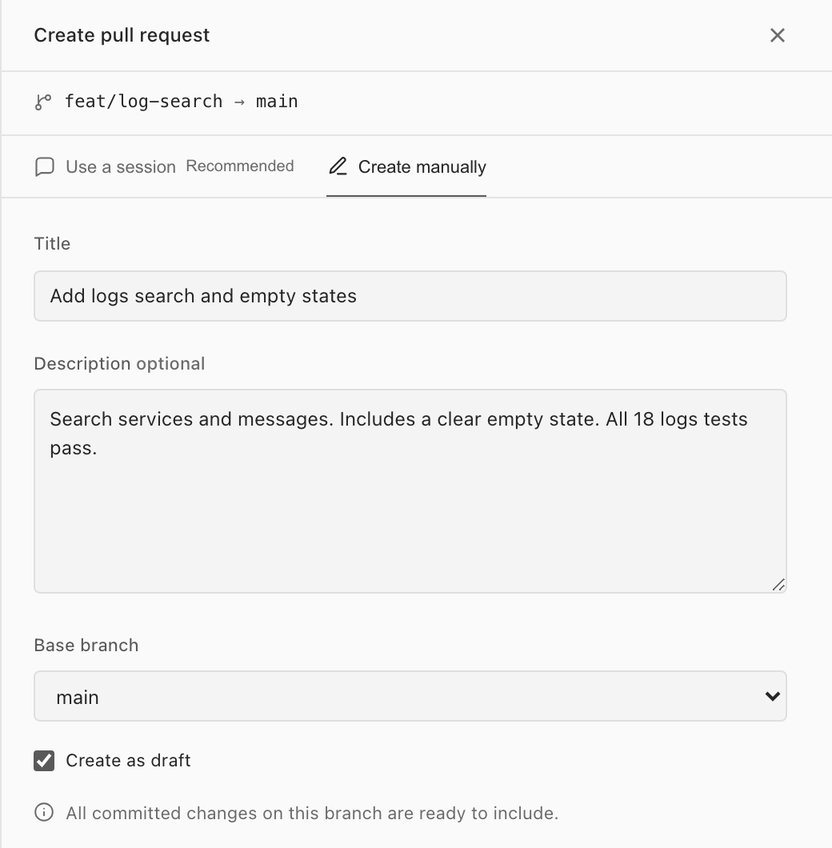
Open the pull request.Watch it pass.
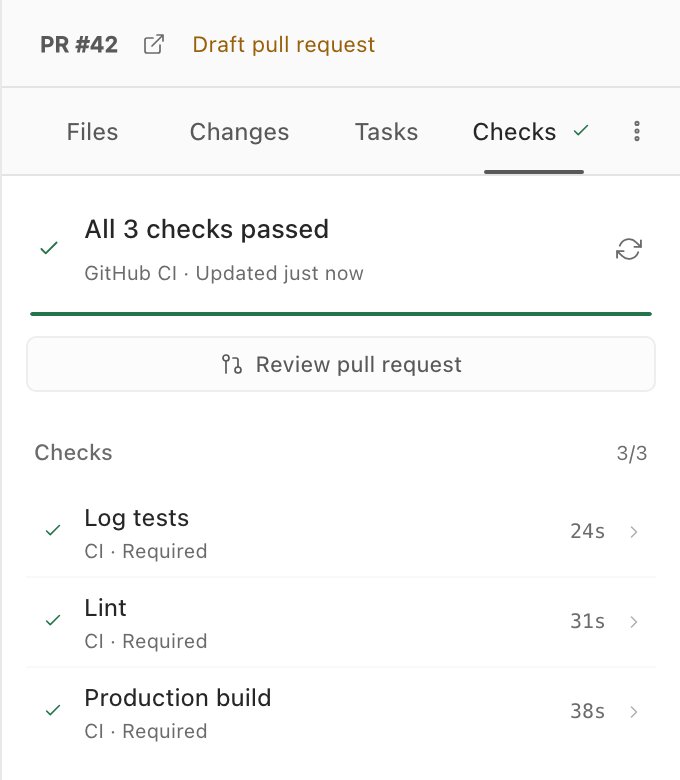
Create the pull request from the branch with its title, description, base and draft state, or let a session review the changes, run checks and prepare it for you. Then follow its CI checks beside the work, and open the review when they pass.
- Create it as a draft while review is still under way.
- Every check with its duration, refreshed without leaving the workspace.
- The same flow works from the web portal and the mobile app, on the host that owns the worktree.
The rest of Git.Without leaving.
Glueprint runs your own git, so your .gitconfig, hooks and credentials apply unchanged, on your machine or a host you're connected to.
-
Branches and tags
Switch, rename or delete branches; pull, fetch, sync and publish; and tag any commit from History.
-
History graph
A commit graph with a lane per branch and full search. Check out, cherry-pick, revert, reset or tag any commit.
-
Three-pane conflicts
Yours, theirs and the common base side by side. Take either side or both, edit by hand, then continue.
-
Compare worktrees
Diff two worktrees side by side, such as one agent's work against another's, without committing either.
-
Stash
Set work aside with an optional message and untracked files, then apply, pop or drop it later.
-
Always current
A file watcher refreshes Git as files change, and a background fetch every five minutes keeps ahead and behind accurate.
Your GitHub work.In one place.
The GitHub plugin gathers pull requests, issues and Actions from every repository your login can reach, with the next step one click away. It uses the GitHub sign-in you already connected for Git.
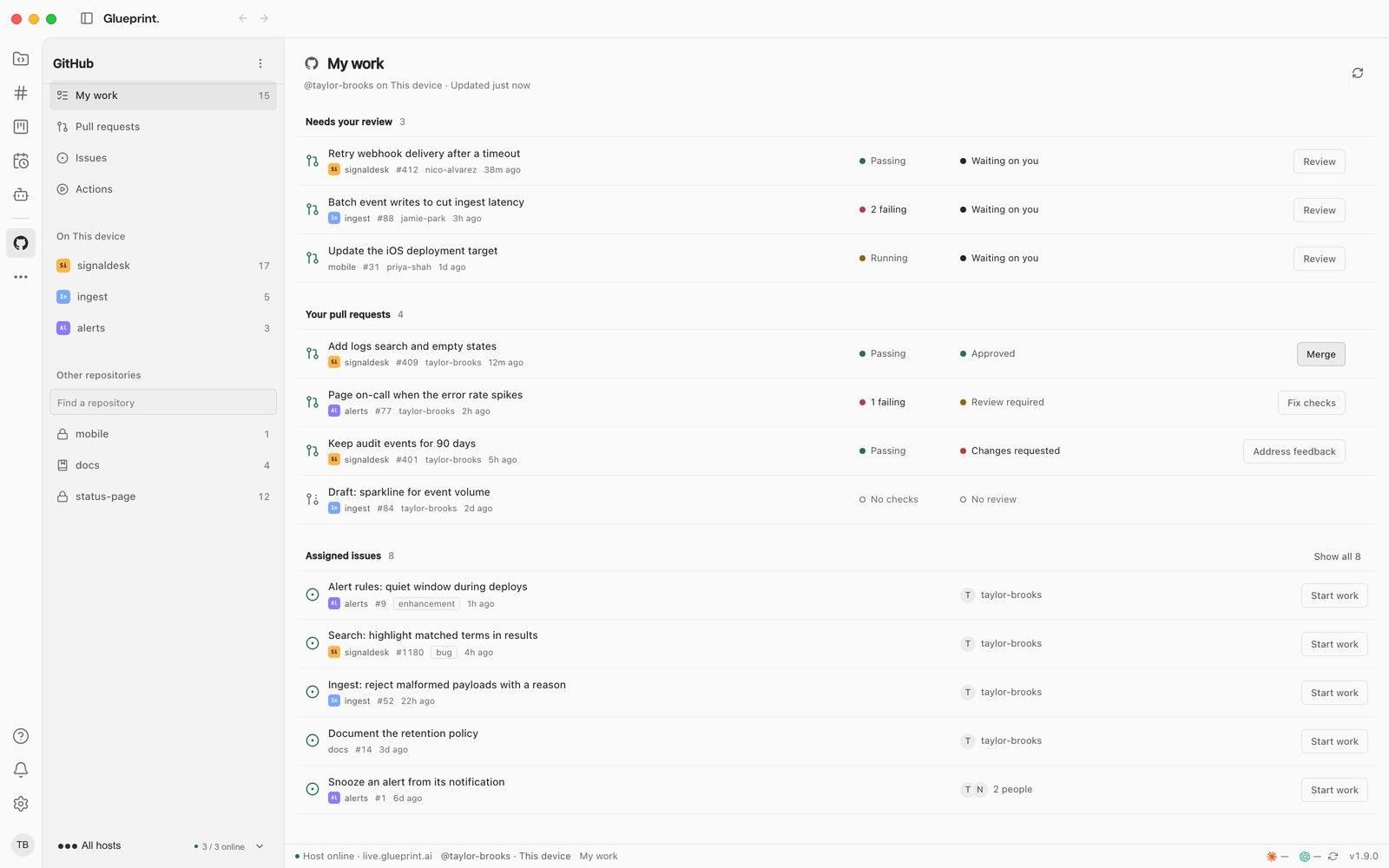
- 01Four areasMy work, pull requests, issues and Actions, across every repository your login can reach.
- 02Your repositoriesRepositories that match a project on this host come first, then every other one, searchable.
- 03My workPull requests waiting on you, your own pull requests, and the issues assigned to you.
- 04Checks and reviewEach pull request's checks and review state, at a glance.
- 05The next stepReview it, merge it, fix its checks or address feedback, depending on where it stands.
- 06Start workStart an agent on an issue, with the issue as context and a suggested branch and worktree.
A run failed.Hand it to an agent.
Open a repository's workflow runs, see what failed, and start a session to fix it, without copying a log anywhere.
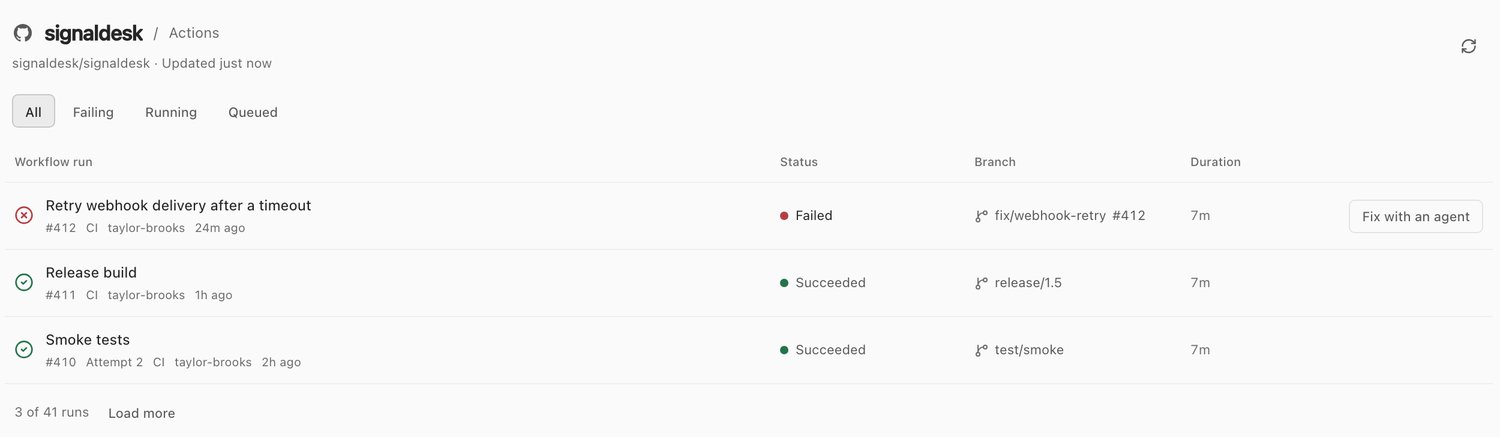
- From a pull request, start a session to review it, fix its checks or address feedback, in the pull request's own worktree.
- From an issue, Start work opens a session with the issue as context and suggests a branch and a new worktree.
- Re-run everything, re-run only the failed jobs, or cancel a run.
- A pull request in one of your projects opens in Glueprint's review sheet.
Your GitHub sign-in stays on the host that owns it. Opening the plugin for another host needs the Pro plan.
GR-800 Review before it ships
Read the next change.Then ship it.
Download Glueprint, open a project you know, and review what your agent changed before it leaves your machine.